PathLayer
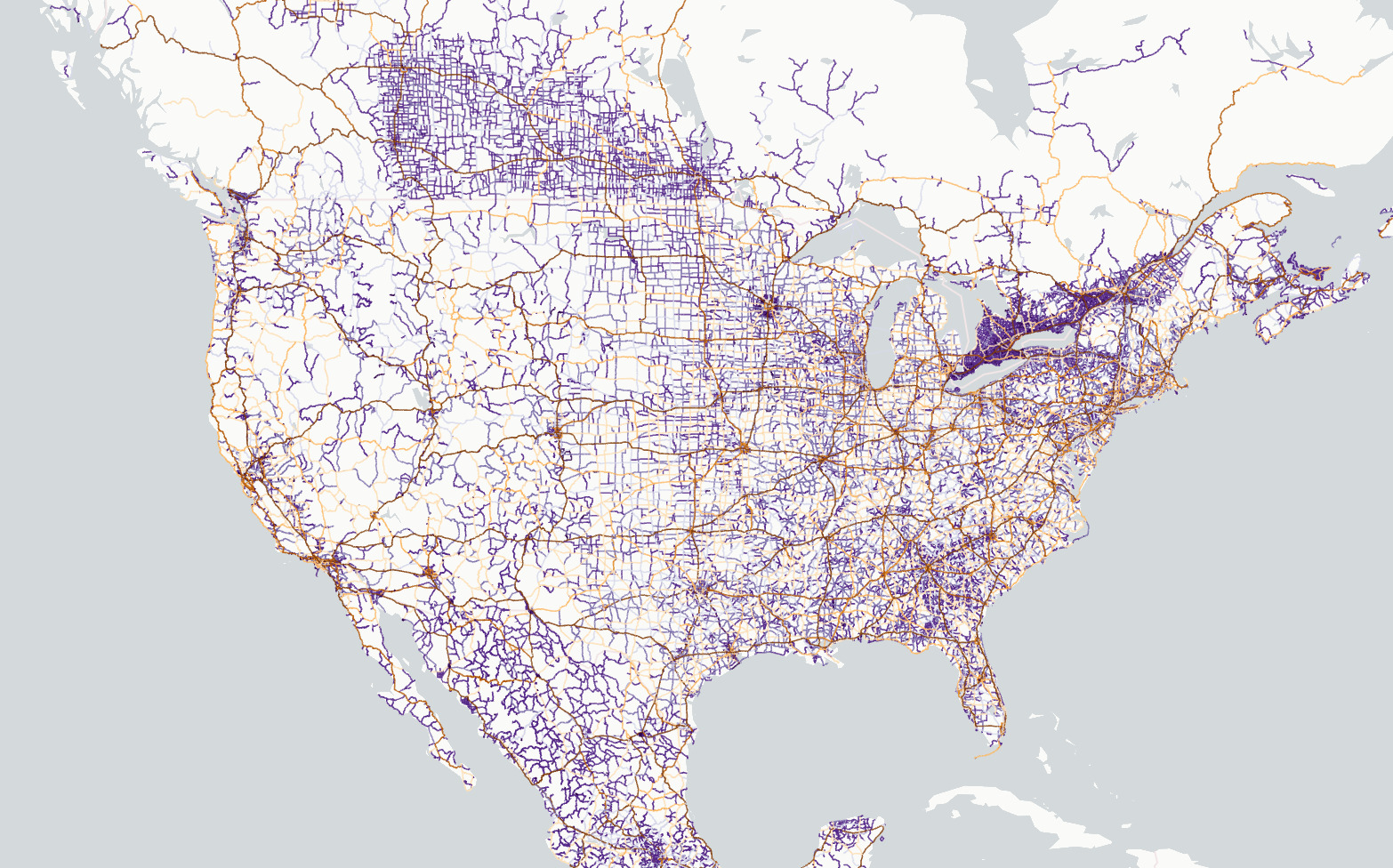
Screenshot from North America roads example
lonboard.PathLayer 
Bases: BaseArrowLayer
The PathLayer renders lists of coordinate points as extruded polylines with
mitering.
Example:
From GeoPandas:
import geopandas as gpd
from lonboard import Map, PathLayer

# A GeoDataFrame with LineString or MultiLineString geometries
gdf = gpd.GeoDataFrame()
layer = PathLayer.from_geopandas(
    gdf,
    get_color=[255, 0, 0],
    width_min_pixels=2,
)
m = Map(layer)
From an Arrow-compatible source like pyogrio or geoarrow-rust:
from geoarrow.rust.io import read_flatgeobuf
from lonboard import Map, PathLayer

# Example: A FlatGeobuf file with LineString or MultiLineString geometries
table = read_flatgeobuf("path/to/file.fgb")
layer = PathLayer(
    table,
    get_color=[255, 0, 0],
    width_min_pixels=2,
)
m = Map(layer)
auto_highlight 
auto_highlight = Bool(default_value=False)
When true, the current object pointed to by the mouse pointer (when hovered over) is
highlighted with highlightColor.
Requires pickable to be True.
- Type:
bool - Default:
False
before_id 
before_id = Unicode(None, allow_none=True)
The identifier of a layer in the Maplibre basemap layer stack.
This deck.gl layer will be rendered just before the layer with the given identifier. You can find such an identifier by inspecting the basemap style JSON.
For example, in the Carto Positron style, if
you look at the raw JSON
data, each layer has
an "id" property. The first layer in the basemap stack has "id": "background".
So if you pass before_id="background", you won't see your deck.gl layer because it
will be rendered below all layers in the Maplibre basemap.
A common choice for Carto-based styles is to use before_id="watername_ocean" so
that your deck.gl layer is rendered above the core basemap elements but below all
text labels.
Info
This only has an effect when the map's basemap is a
MaplibreBasemap, and the map is rendering
in "interleaved" mode.
billboard 
billboard = Bool(None, allow_none=True)
If True, extrude the path in screen space (width always faces the camera).
If False, the width always faces up.
- Type:
bool, optional - Default:
False
cap_rounded 
cap_rounded = Bool(None, allow_none=True)
Type of caps. If True, draw round caps. Otherwise draw square caps.
- Type:
bool, optional - Default:
False
extensions 
extensions = tag(sync=True, **(widget_serialization))
A list of layer extension objects to add additional features to a layer.
get_color 
get_color = ColorAccessor(None, allow_none=True)
The color of each path in the format of [r, g, b, [a]]. Each channel is a number
between 0-255 and a is 255 if not supplied.
- Type: ColorAccessor, optional
- If a single
listortupleis provided, it is used as the color for all paths. - If a numpy or pyarrow array is provided, each value in the array will be used as the color for the path at the same row index.
- If a single
- Default:
[0, 0, 0, 255].
get_width 
get_width = FloatAccessor(None, allow_none=True)
The width of each path, in units specified by width_units (default 'meters').
- Type: FloatAccessor, optional
- If a number is provided, it is used as the width for all paths.
- If an array is provided, each value in the array will be used as the width for the path at the same row index.
- Default:
1.
highlight_color 
highlight_color = VariableLengthTuple(
    Int(), default_value=(0, 0, 128, 128), minlen=3, maxlen=4
)
RGBA color to blend with the highlighted object (the hovered over object if
auto_highlight=true). When the value is a 3 component (RGB) array, a default alpha
of 255 is applied.
- Type: List or Tuple of integers
- Default:
[0, 0, 128, 128]
joint_rounded 
joint_rounded = Bool(None, allow_none=True)
Type of joint. If True, draw round joints. Otherwise draw miter joints.
- Type:
bool, optional - Default:
False
miter_limit 
miter_limit = Int(None, allow_none=True)
The maximum extent of a joint in ratio to the stroke width.
Only works if jointRounded is False.
- Type:
float, optional - Default:
4
opacity 
opacity = Float(1, min=0, max=1)
The opacity of the layer.
- Type:
float. Must range between 0 and 1. - Default:
1
pickable 
pickable = Bool(default_value=True)
Whether the layer responds to mouse pointer picking events.
This must be set to True for tooltips and other interactive elements to be
available. This can also be used to only allow picking on specific layers within a
map instance.
Note that picking has some performance overhead in rendering. To get the absolute
best rendering performance with large data (at the cost of removing interactivity),
set this to False.
- Type:
bool - Default:
True
selected_index 
selected_index = Int(None, allow_none=True)
The positional index of the most-recently clicked on row of data.
You can use this to access the full row of data from a GeoDataFrame
gdf.iloc[layer.selected_index]
Setting a value here from Python will do nothing. This attribute only exists to be
updated from JavaScript on a map click. Note that pickable must be True (the
default) on this layer for the JavaScript onClick handler to work; if pickable
is set to False, selected_index will never update.
Note that you can use observe to call a function whenever a new value is received
from JavaScript. Refer
here
for an example.
table 
table = ArrowTableTrait(allowed_geometry_types={LINESTRING, MULTILINESTRING})
A GeoArrow table with a LineString or MultiLineString column.
This is the fastest way to plot data from an existing GeoArrow source, such as geoarrow-rust or geoarrow-pyarrow.
If you have a GeoPandas GeoDataFrame, use
from_geopandas instead.
visible 
visible = Bool(default_value=True)
Whether the layer is visible.
Under most circumstances, using the visible attribute to control the visibility of
layers is recommended over removing/adding the layer from the Map.layers list.
In particular, toggling the visible attribute will persist the layer on the
JavaScript side, while removing/adding the layer from the Map.layers list will
re-download and re-render from scratch.
- Type:
bool - Default:
True
width_max_pixels 
width_max_pixels = Float(None, allow_none=True, min=0)
The maximum path width in pixels. This prop can be used to prevent the path from getting too thick when zoomed in.
- Type:
float, optional - Default:
None
width_min_pixels 
width_min_pixels = Float(None, allow_none=True, min=0)
The minimum path width in pixels. This prop can be used to prevent the path from getting too thin when zoomed out.
- Type:
float, optional - Default:
0
width_scale 
width_scale = Float(None, allow_none=True, min=0)
The path width multiplier that multiplied to all paths.
- Type:
float, optional - Default:
1
width_units 
width_units = Unicode(None, allow_none=True)
The units of the line width, one of 'meters', 'common', and 'pixels'. See
unit
system.
- Type:
str, optional - Default:
'meters'
__init__ 
__init__(
    table: ArrowStreamExportable,
    *,
    _rows_per_chunk: int | None = None,
    **kwargs: Unpack[PathLayerKwargs]
) -> None
Construct a Layer from a GeoArrow table.
This accepts Arrow data from any library implementing the Arrow PyCapsule Interface, including pyarrow, arro3, DuckDB, and others.
The geometry column will be reprojected to EPSG:4326 if it is not already in
that coordinate system.
Parameters:
-
table(ArrowStreamExportable) –An Arrow table or stream object from a library implementing the [Arrow PyCapsule Interface]. This object must contain a column with a geometry type that has the
geoarrowextension metadata.
Other Parameters:
-
kwargs(Unpack[BaseLayerKwargs]) –parameters passed on to
__init__
Returns:
-
None–A Layer with the initialized data.
from_duckdb 
from_duckdb(
    sql: str | DuckDBPyRelation,
    con: DuckDBPyConnection | None = None,
    *,
    crs: str | CRS | None = None,
    **kwargs: Unpack[PathLayerKwargs]
) -> Self
Construct a Layer from a duckdb-spatial query.
With DuckDB >= 1.5, the CRS of a GEOMETRY column is read
automatically from the column type (e.g. GEOMETRY('EPSG:3857')) and
the data is reprojected to EPSG:4326 as needed.
The crs keyword parameter is deprecated for such input and is only
needed when the data cannot describe its own CRS: WKB_BLOB or 2D
columns (POINT_2D, LINESTRING_2D, POLYGON_2D, BOX_2D), DuckDB
older than 1.5, or a GEOMETRY column without a CRS encoded. In those
cases, the user must ensure that data has been reprojected to
EPSG:4326 or pass the existing CRS of the data in the crs keyword
parameter.
Parameters:
-
sql(str | DuckDBPyRelation) –The SQL input to visualize. This can either be a string containing a SQL query or the output of the duckdb
sqlfunction. -
con(DuckDBPyConnection | None, default:None) –The current DuckDB connection. This is required when passing a
strto thesqlparameter.
Other Parameters:
-
crs(str | CRS | None) –The CRS of the input data, for input that cannot describe its own CRS (see above). This can either be a string passed to
pyproj.CRS.from_user_inputor apyproj.CRSobject. Errors if it conflicts with the CRS encoded in a DuckDB >= 1.5GEOMETRYcolumn. Defaults to None. -
kwargs(Unpack[BaseLayerKwargs]) –parameters passed on to
__init__
Returns:
-
Self–A Layer with the initialized data.
from_geopandas 
from_geopandas(
    gdf: GeoDataFrame,
    *,
    auto_downcast: bool = True,
    **kwargs: Unpack[PathLayerKwargs]
) -> Self
Construct a Layer from a geopandas GeoDataFrame.
The GeoDataFrame will be reprojected to EPSG:4326 if it is not already in that
coordinate system.
Parameters:
-
gdf(GeoDataFrame) –The GeoDataFrame to set on the layer.
Other Parameters:
-
auto_downcast(bool) –If
True, automatically downcast to smaller-size data types if possible without loss of precision. This calls pandas.DataFrame.convert_dtypes and pandas.to_numeric under the hood. -
kwargs(Unpack[BaseLayerKwargs]) –parameters passed on to
__init__
Returns:
-
Self–A Layer with the initialized data.